
Google Ads 101: Stop Overpaying (and Under-Optimising) Your Campaigns
Wednesday 26th March 2025, 09:31
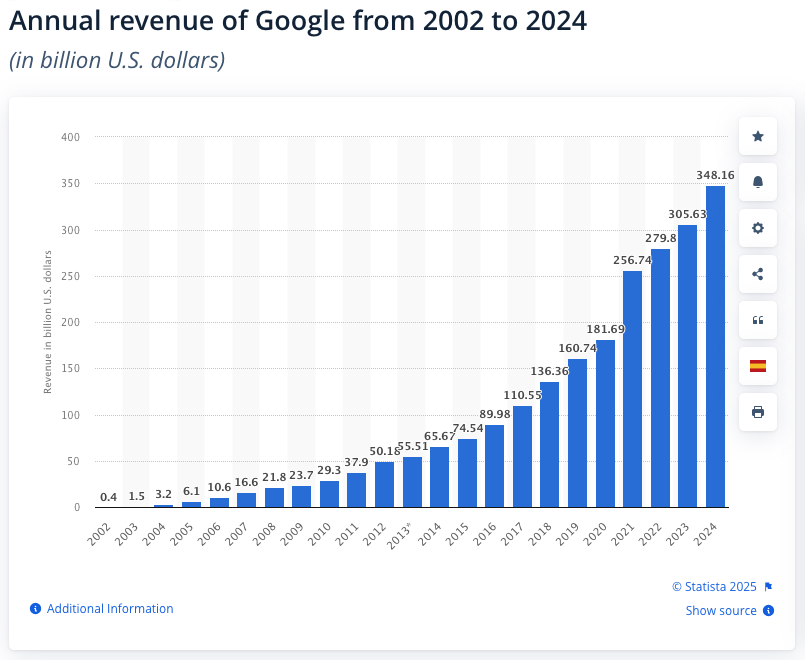
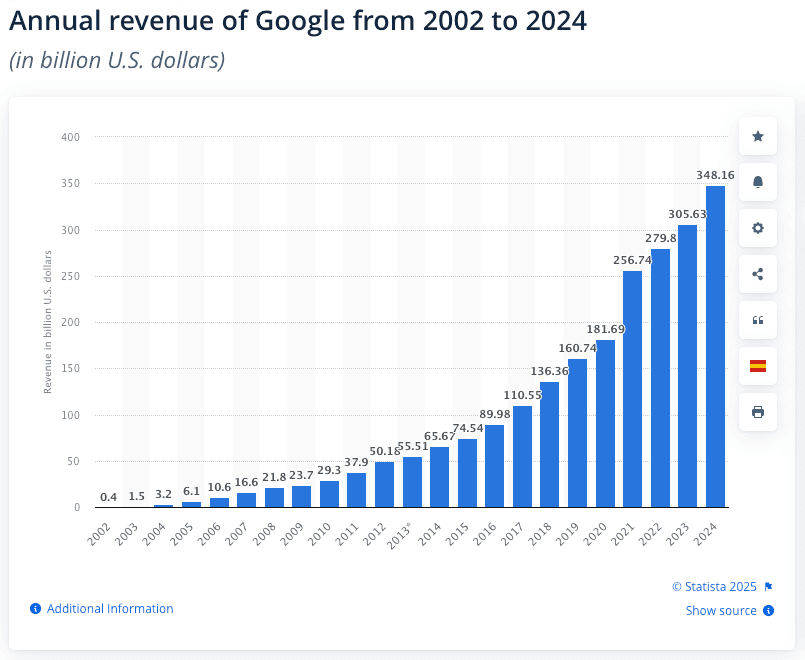
Yes, Google Loves Your Money
Before we dive in, here’s a not-so-secret truth: Google is a business, and it loves your sweet, sweet ad spend. The better you understand how Google Ads really works—quality score, auctions, policies—the better positioned you’ll be to avoid autopilot changes that might waste your budget.
Below, we break down some fundamentals on Google Ads. Whether you’re new to PPC or you’ve been living in the platform for years, a little refresher never hurts (especially where your wallet is concerned).
1. The Auction: Quality Score + Bids = Ad Rank
- Quality Score: Google’s measure of how relevant your ads, keywords, and landing pages are. Better relevance = higher Quality Score.
- Bid: The maximum you’re willing to pay per click.
Google multiplies these two factors (roughly speaking) to determine your Ad Rank. High Ad Rank means you could show up in a better position—even if you’re bidding less—because Google sees your ad as highly relevant to the user.
Pro Tip: You can try outbidding your competitors, but that’s a short-term (and often expensive) fix. Long-term, improve your Quality Score with tighter keyword targeting, compelling ad copy, and relevant landing pages.
2. Relevance Saves You Money—Here’s How
Why does Google care if your ad is relevant? Because user satisfaction keeps everyone coming back to the Google search engine—and keeps you feeding the machine with ad dollars. It’s a symbiotic relationship (if you squint).
- Keywords: Make sure you’re targeting words that match user intent. If your brand sells premium products, you probably don’t want to show up for “free [your product] alternatives.”
- Ad Copy: Keep it consistent with the keyword and your landing page content. If you promise “Buy 1, Get 1 Free,” make sure the page you send users to actually mentions that promo.
- Landing Pages: If your ad touts an “XYZ Offer,” link to a page talking about that exact offer—not your homepage. A mismatch leads to bounces, wasted spend, and tears.
3. The Search Term Report: Your #1 Friend (Or Frenemy)
Google Ads loves to show you how many clicks you got—but the real goldmine is the Search Term Report, which shows what people actually typed into Google to trigger your ad. This is often a revelation:
- Find Irrelevant Traffic: Did you bid on “money app,” only to learn your ad showed for “free money app” queries? Time to add negative keywords.
- Spot Opportunities: Maybe you discover a surprisingly profitable long-tail query. Boom—turn it into its own keyword or ad group.
- Cut the Fat: If certain terms are spending a lot without conversions, refine or exclude them. Not every query deserves your budget.
Remember: Negative keywords are your friend. They’re basically a fence protecting your budget from the hordes of irrelevant clicks.
4. Competitor Analysis: Auction Insights
Ever notice your cost-per-click (CPC) randomly shoots up one month? Auction Insights might show you that a deep-pocketed competitor entered the arena. Or maybe a cheap competitor quit bidding and your CPC went down.
- Impression Share: Shows how often you and others in your space actually appear for relevant searches.
- Overlap Rate & Position Above Rate: Tells you how frequently someone else’s ad outranks yours.
- So What? If a random brand you don’t recognise is always outranking you, maybe your keywords are too broad or you’ve stumbled into an unrelated space.
5. Ad Extensions: Free Real Estate
Ad extensions—sitelinks, callouts, structured snippets—can make your ad look huge and push competitors further down the page.
- Sitelinks: These clickable mini-URLs can direct people to key pages, boosting CTR and segmenting traffic by interest.
- Callouts & Snippets: Quick hits of info, like “Free Shipping” or “24/7 Support.”
- Important: Keep them relevant. If you’re talking about “home insurance,” don’t throw in a callout for “designer lamps” or “fancy cat food.” Google sees all, and your Quality Score might pay the price.
6. Account Structure: Keep It (Relatively) Simple
Most advertisers do best with a clear hierarchy:
- Campaigns: Set budgets, geotargeting, and major theme splits (e.g., one campaign per product line if you must track spend separately).
- Ad Groups: Group your keywords by tighter themes or sub-products.
- Ads & Extensions: Each ad group features ads relevant to the group’s keywords and landing pages, plus any tailor-made extensions.
If you catch yourself shoving every keyword into a single ad group “just to see what happens,” take a deep breath. Start reorganising. Google will reward your sense of structure with better performance data, relevant ad copy, and more efficient spending.
7. Ads: Embrace the (One) Responsive Ad Format
Gone are the days of writing 3–4 static ads per ad group. Responsive Search Ads let you provide up to 15 headlines and 4 descriptions. Google mixes and matches these to see what performs best.
- Varied Headlines: Don’t say the same thing 15 times in slightly different words. Use different calls-to-action, brand slogans, or product benefits.
- Learning vs. Low Performance: Google’s reporting can show you how often each headline gets served. Low “serve” rates might mean your new tagline is a flop—or it simply needs more time.
- Compliance: Watch out for all-caps, repeated exclamation marks, or other style no-nos. Google’s policy bots will pounce on you faster than you can say, “But my brand name is spelled with all caps, honest!”
8. Continual Optimisation: Because the Market Never Sleeps
- Check Your Search Terms Weekly: Or at least monthly, depending on your spend.
- Review Auction Insights: Who’s new, who’s gone, and who’s aggressively outranking you?
- Refine Ad Copy & Extensions: If a message is killing it, see if you can replicate that win on your landing page or across other ad groups.
- Don’t Rely on Google’s Suggestions Blindly: Remember, Google’s automated “recommendations” mostly optimise for more clicks (aka more money for Google projects that end up in the Google Graveyard). Let real performance data guide your decisions.
Final Takeaway
Google Ads isn’t a set-and-forget platform. It requires a cycle of planning, monitoring, and tweaking—all while sidestepping Google’s friendly, profit-driven nudges. Keep your keywords tight, your ad copy relevant, your landing pages consistent, and your eyes peeled for worthless queries.
Yes, Google wants you to spend money. No, that doesn’t mean you should hand it over without a fight. By harnessing the fundamentals—quality score, search term optimisation, strategic bidding, and thoughtful account structure—you’ll spend smarter, drive better leads, and maybe funnel fewer dollars directly into the Google machine.
Want more details or a personalized walkthrough? Reach out to our team at Vuzo.co.uk for a refresh of your Google Ads performance.